 PETIRS
Panduan Pembuatan Web Service REST API Standar FHIR Kemenkes
Sobat IT RS, pernah pusing baca dokumen SatuSehat? Bikin REST API FHIR itu rasanya kayak ngulik puzzle, tiap potongannya kudu presisi. Salah header, salah JSON, siap-siap disemprot verifikator Kemenkes, atau data gagal masuk. Nah, kali ini kita kupas bareng cara bikin web service REST API FHIR Kemenkes, khusus resource Patient, Encounter, dan Condition. Biar waktu integrasi SatuSehat nggak bikin darah tinggi. Kita pakai Python Flask (bisa gampang diubah ke stack lain), langsung contek-contek, ada mapping struktur, contoh request, respons, validasi, sampai handling error standar.
Nggak ada teori ngawang. Langsung praktik. Sikat!
FHIR Kemenkes: Sedikit Teori Biar Nggak Tersesat
- FHIR (Fast Healthcare Interoperability Resources): Standar global pertukaran data kesehatan, model pakai resource (Patient, Encounter, Condition, dst).
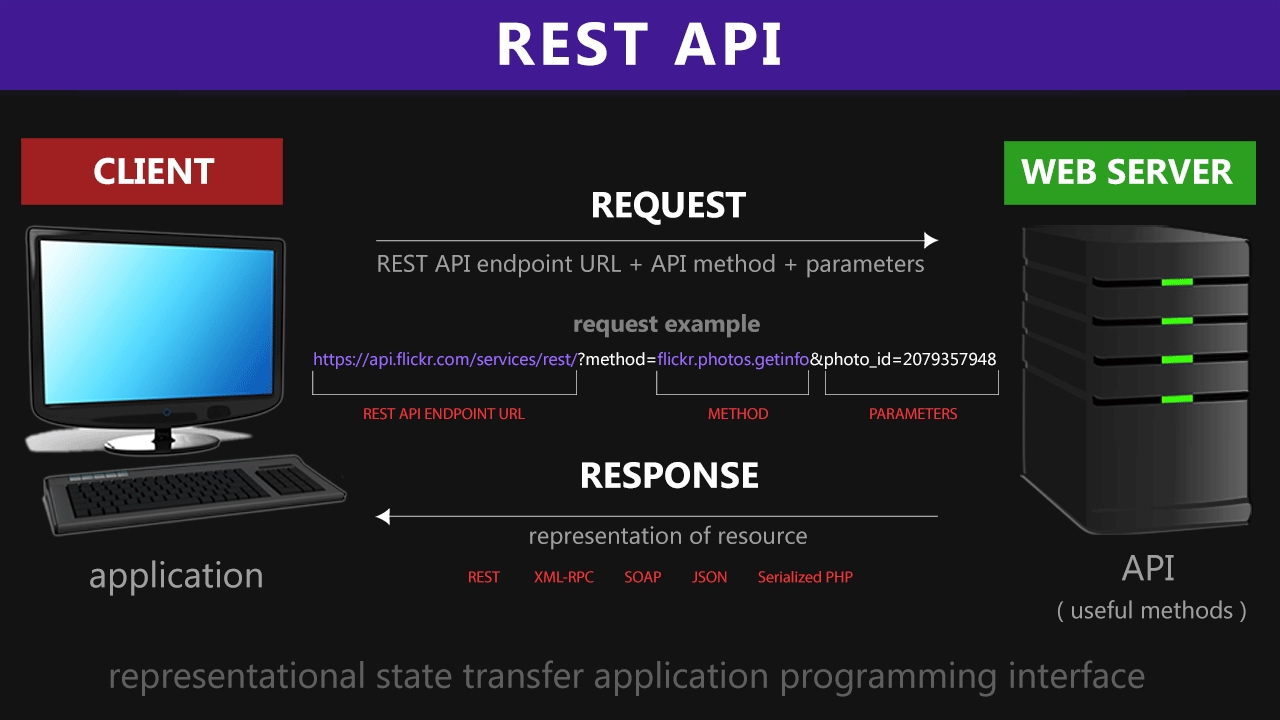
- REST API: Akses data via HTTP method (POST, GET, PUT, DELETE). Format data umumnya JSON.
- SatuSehat Kemenkes: Wajibkan semua RS integrasi via FHIR REST API, resource minimal Patient, Encounter, Condition, Observation.
- Base URL SatuSehat:
https://api-satusehat.kemkes.go.id/fhir-r4/v1/. - Autentikasi OAuth2 JWT (client credentials).
Persiapan Lingkungan
- Python 3.x terinstall (bisa juga NodeJS, Java, Golang, konsep sama).
- Flask untuk web service (pip install Flask).
- Untuk validasi FHIR, pakai
fhir.resources(pip install fhir.resources). - Postman/curl untuk uji endpoint.
# install
pip install Flask
pip install fhir.resources
Struktur Project Sederhana
- app.py — main program, semua endpoint.
- resources/ — folder simpan struktur JSON resource dummy (boleh hardcode dulu, nanti konek DB/SIMRS).
project/
├── app.py
└── resources/
    ├── patient_sample.json
    ├── encounter_sample.json
    └── condition_sample.json
Contoh Struktur FHIR Resource
Patient (FHIR R4)
{
  "resourceType": "Patient",
  "identifier": [
    {
      "system": "http://sys-idhospital.com/patient/norm",
      "value": "123456"
    }
  ],
  "name": [
    {
      "use": "official",
      "text": "Siti Aminah"
    }
  ],
  "gender": "female",
  "birthDate": "1990-04-12"
}
Encounter (FHIR R4)
{
  "resourceType": "Encounter",
  "identifier": [
    {
      "system": "http://sys-idhospital.com/encounter",
      "value": "ECO202304250001"
    }
  ],
  "status": "finished",
  "class": {
    "system": "http://terminology.hl7.org/CodeSystem/v3-ActCode",
    "code": "AMB",
    "display": "ambulatory"
  },
  "subject": {
    "reference": "Patient/123456"
  },
  "period": {
    "start": "2023-04-25T08:00:00+07:00",
    "end": "2023-04-25T09:00:00+07:00"
  }
}
Condition (FHIR R4)
{
  "resourceType": "Condition",
  "subject": {
    "reference": "Patient/123456"
  },
  "code": {
    "coding": [
      {
        "system": "http://hl7.org/fhir/sid/icd-10",
        "code": "A09",
        "display": "Diare dan gastroenteritis"
      }
    ]
  },
  "onsetDateTime": "2023-04-25T08:30:00+07:00"
}
Step-by-Step: Buat REST API FHIR
1. Setup Flask App
from flask import Flask, request, jsonify
from fhir.resources.patient import Patient
from fhir.resources.encounter import Encounter
from fhir.resources.condition import Condition
import json

app = Flask(__name__)
2. Endpoint POST Resource
POST /fhir/Patient— tambah patientPOST /fhir/Encounter— tambah encounterPOST /fhir/Condition— tambah condition
@app.route('/fhir/Patient', methods=['POST'])
def create_patient():
    data = request.get_json(force=True)
    try:
        patient = Patient(**data)  # validasi FHIR
        # Simpan ke DB (ponytail: skip, return dummy)
        return jsonify(patient.dict()), 201
    except Exception as e:
        return jsonify({"error": str(e)}), 400

@app.route('/fhir/Encounter', methods=['POST'])
def create_encounter():
    data = request.get_json(force=True)
    try:
        encounter = Encounter(**data)
        return jsonify(encounter.dict()), 201
    except Exception as e:
        return jsonify({"error": str(e)}), 400

@app.route('/fhir/Condition', methods=['POST'])
def create_condition():
    data = request.get_json(force=True)
    try:
        condition = Condition(**data)
        return jsonify(condition.dict()), 201
    except Exception as e:
        return jsonify({"error": str(e)}), 400
3. Endpoint GET Resource (Dummy)
GET /fhir/Patient/<id>— ambil patient by ID (dummy lookup, belum DB)
@app.route('/fhir/Patient/<id>', methods=['GET'])
def get_patient(id):
    # load dummy file
    with open('resources/patient_sample.json') as f:
        patient = json.load(f)
    if patient['identifier'][0]['value'] == id:
        return jsonify(patient), 200
    return jsonify({"error": "Not found"}), 404
4. Jalankan App
if __name__ == '__main__':
    app.run(port=5000, debug=True)
Tips & Trik Validasi SatuSehat
- Wajib isi
identifierunik per resource (mapping ke primary key/no rekam medis SIMRS). - Field
systemdiidentifiersebaiknya URL internal RS, misal:http://rs-kawanbaik.com/patient/norm. - Format tanggal wajib ISO8601 (YYYY-MM-DD atau YYYY-MM-DDTHH:MM:SS+07:00).
- Reference antar-resource harus sesuai:
subject.reference= "Patient/<id>" tepat. Salah dikit, mapping SatuSehat gagal. - Kode diagnosis pakai ICD-10, kode prosedur ICD-9, SNOMED juga bisa sesuai requirement.
Contoh Error SatuSehat & Cara Deteksi
# Error: "Field identifier.system must be a valid URI"
# Fix: pastikan system pakai URL, bukan string biasa.

# Error: "Missing required field: code"
# Fix: untuk Condition, wajib ada code.coding.code & code.coding.system.

# Error: "subject.reference not found"
# Fix: pastikan reference bentuk: "Patient/123456"
Mapping Data SIMRS ke FHIR
Struktur Data SIMRS (SQL Server)
-- Tabel pasien
CREATE TABLE Pasien (
    Norm VARCHAR(16) PRIMARY KEY,
    NamaPasien VARCHAR(100),
    TglLahir DATE,
    JenisKelamin CHAR(1)
);

-- Tabel kunjungan
CREATE TABLE Kunjungan (
    NoKunjungan VARCHAR(20) PRIMARY KEY,
    Norm VARCHAR(16),
    TglMasuk DATETIME,
    TglKeluar DATETIME,
    FOREIGN KEY (Norm) REFERENCES Pasien(Norm)
);

-- Tabel diagnosis
CREATE TABLE Diagnosis (
    IDDiagnosis INT PRIMARY KEY,
    NoKunjungan VARCHAR(20),
    KodeICD10 VARCHAR(10),
    TglDiagnosis DATETIME,
    FOREIGN KEY (NoKunjungan) REFERENCES Kunjungan(NoKunjungan)
);
Query Data Pasien Untuk FHIR
SELECT
    Norm AS identifier_value,
    NamaPasien AS name_text,
    CASE WHEN JenisKelamin = 'L' THEN 'male' ELSE 'female' END AS gender,
    TglLahir AS birthDate
FROM Pasien
WHERE Norm = '123456'
Mapping ke Patient Resource
{
  "resourceType": "Patient",
  "identifier": [
    {
      "system": "http://rs-kawanbaik.com/patient/norm",
      "value": "{Norm}"
    }
  ],
  "name": [
    {
      "use": "official",
      "text": "{NamaPasien}"
    }
  ],
  "gender": "{gender}",
  "birthDate": "{TglLahir}"
}
Mapping Encounter & Condition
- Encounter: mapping dari tabel Kunjungan.
- Condition: mapping dari tabel Diagnosis.
Simulasi Uji Endpoint
POST Patient via Curl
curl -X POST http://localhost:5000/fhir/Patient \
-H "Content-Type: application/json" \
-d '{
  "resourceType": "Patient",
  "identifier": [
    {
      "system": "http://rs-kawanbaik.com/patient/norm",
      "value": "123456"
    }
  ],
  "name": [
    {
      "use": "official",
      "text": "Siti Aminah"
    }
  ],
  "gender": "female",
  "birthDate": "1990-04-12"
}'
Respons Sukses
{
  "resourceType": "Patient",
  "identifier": [...],
  "name": [...],
  "gender": "female",
  "birthDate": "1990-04-12"
}
Respons Error (Salah Format)
{
  "error": "Missing required field: identifier"
}
Autentikasi OAuth2 (Kemenkes SatuSehat)
- Semua request ke SatuSehat wajib header
Authorization: Bearer <token>. - Token didapat dari endpoint token Kemenkes, pakai client_id dan client_secret yang didaftarkan RS.
# Request token
curl -X POST https://api-satusehat.kemkes.go.id/oauth2/v1/token \
  -d 'grant_type=client_credentials' \
  -d 'client_id=YOUR_CLIENT_ID' \
  -d 'client_secret=YOUR_CLIENT_SECRET'
Tambahkan Middleware Auth (Contoh sederhana)
from functools import wraps

def require_auth(f):
    @wraps(f)
    def decorated(*args, **kwargs):
        auth = request.headers.get('Authorization')
        if not auth or not auth.startswith('Bearer '):
            return jsonify({"error": "Unauthorized"}), 401
        # TODO: Validasi token ke SatuSehat (ponytail: skip, demo only)
        return f(*args, **kwargs)
    return decorated

@app.route('/fhir/Patient', methods=['POST'])
@require_auth
def create_patient():
    # ... seperti di atas
Best Practice & Catatan Lapangan
- Log semua request & response (bisa ke file, bisa DB), biar gampang tracking kalau ada error dari SatuSehat.
- Pakai UUID atau nomor rekam medis real sebagai
identifier.value, hindari data dummy saat live. - Selalu cek dokumentasi SatuSehat terbaru, karena schema & validasi mereka suka update diam-diam.
- Jangan lupa mapping kode referensi standar (ICD, SNOMED) sesuai field.
- Pakai Postman Collection SatuSehat biar nggak salah struktur waktu testing (ada di Postman).
- Kalau gagal validasi, cek error di response body SatuSehat. Biasanya detail errornya cukup jelas, tinggal baca teliti.
- Jangan hardcode token di aplikasi. Refresh otomatis, simpan secure.
- Buat function builder yang konversi data dari DB ke FHIR object (pakai model fhir.resources).
- Laporkan error ke vendor SIMRS kalau mapping internal SIMRS ke FHIR mentok (misal: field SIMRS kurang lengkap, harus tambah kolom baru).
Contoh Function Converter DB ke FHIR Patient (Python)
def simrs_to_fhir_patient(row):
    return {
        "resourceType": "Patient",
        "identifier": [
            {
                "system": "http://rs-kawanbaik.com/patient/norm",
                "value": row["Norm"]
            }
        ],
        "name": [
            {
                "use": "official",
                "text": row["NamaPasien"]
            }
        ],
        "gender": "male" if row["JenisKelamin"] == "L" else "female",
        "birthDate": str(row["TglLahir"])
    }
Upgrade Production: Koneksi Database & Error Handling
- Ganti dummy resource dengan query real dari DB (pakai ORM atau pyodbc, contoh SQL Server).
- Catch dan log semua error, jangan sampai crash, return always HTTP 200/201 success only when benar-benar lolos validasi & simpan.
- Jika resource sudah ada (duplicate identifier), return HTTP 409 Conflict plus pesan error.
Contoh Handler Duplicate
# Pseudocode
if check_patient_exists(identifier):
    return jsonify({"error": "Patient already exists"}), 409
else:
    # simpan patient
    return jsonify(...), 201
Checklist Integrasi SatuSehat
- Endpoint REST API ready (POST / GET / PUT sesuai kebutuhan resource minimal Patient, Encounter, Condition).
- Validasi schema FHIR (pakai library atau manual).
- Header dan format JSON sesuai contoh dokumen Kemenkes.
- Token OAuth2 selalu valid, auto refresh di background.
- Log success/error kirim data ke SatuSehat.
- Dokumentasi endpoint internal (minimal file README dan Postman Collection, biar tim lain gampang tracing).
Penutup (Tanpa Basa-Basi)
Bikin web service REST API FHIR buat SatuSehat itu njelimet, tapi demi compliance dan kelancaran klaim, kudu jalan. Pokok e, mapping data SIMRS ke struktur FHIR, validasi ketat, error handling jelas, dan log setiap proses. Contek-contek di atas tinggal disesuaikan stack di RS, mau Flask, NodeJS, .NET, logic sama.
Kalau stuck mapping field SIMRS atau error dari SatuSehat, langsung cek struktur JSON, cek field wajib, dan pastikan semua kode referensi sudah standar. Biar integrasi nggak bikin migrain!